So, you’ve been loving your Steam Deck, but maybe you’re getting a little tired of holding it all the time. That’s where a dedicated steam deck docking station comes in, transforming your handheld powerhouse into a proper desktop setup. It’s a simple idea, but it makes a world of difference for longer play sessions.
You just slide your Deck into the dock, and suddenly you’re connected to your TV, a full-sized controller, and all your peripherals. It feels like unlocking a secret mode. We’ve been testing a few popular docks to see which ones handle the transition best and which have those little quirks you should know about before buying.
Product Comparison Table: 10 Best Steam Deck Docking Station
| Image | Why We Like This Product | Editor’s Rating | |
 |
JSAUX Upgraded Docking Station 4K@120Hz for Steam Deck OLED/ROG…
|
9.7 |
Read Review |
 |
JSAUX Docking Station for ROG Ally X/ROG Ally/Steam Deck/Legion…
|
9.5 |
Read Review |
 |
JSAUX Docking Station & 100W Charger for ROG Xbox…
|
9.2 |
Read Review |
 |
Anker Steam Deck Dock, Docking Station for Steam Deck…
|
9.0 |
Read Review |
 |
UGREEN Steam Deck Dock 9-in-1 USB C Docking Station…
|
8.8 |
Read Review |
 |
iVANKY 4K@144Hz Steam Deck Dock, 8-in-1 Docking Station for…
|
8.5 |
Read Review |
 |
UGREEN Steam Deck Dock 6-in-1 4K@120Hz HDMI 2.1, 100W…
|
8.3 |
Read Review |
 |
Steam Deck Dock, WAVLINK 6-in-1 Docking Station for Steam…
|
8.1 |
Read Review |
 |
SABRENT Docking Station for Steam Deck & ROG Ally…
|
7.8 |
Read Review |
 |
YCE 12-in-1 Dual Fan Steam Deck Dock for Valve…
|
7.6 |
Read Review |
Quick Review For Top 10 Steam Deck Docking Station
JSAUX Upgraded Docking Station 4K@120Hz for Steam Deck OLED/ROG Ally X/Legion Go (S)/MSi Claw, 6-in-1 Steam Deck Dock with HDMI 2.1, Gigabit Ethernet, 3 USB 3.0, 100W Charge for Steam Deck LCD-HB0603

The JSAUX Upgraded Docking Station HB0603 is designed to turn your handheld gaming PC into a full desktop setup. It’s a 6-in-1 hub that connects your Steam Deck, ROG Ally X, Legion Go S, or other supported devices to a bigger screen and more peripherals with minimal fuss.
Its headline feature is the upgraded HDMI 2.1 port. This allows for a 4K resolution at a 120Hz refresh rate on a compatible TV or monitor. That’s double the refresh rate of many standard docks.
You get incredibly smooth visuals, which makes fast-paced games feel more responsive and reduces motion blur. It’s a significant upgrade for both high-action gaming and watching high-frame-rate content.
Keeping your device powered is crucial, and this dock supports up to 100W Power Delivery charging. It can deliver enough power to run your handheld in its highest performance mode, like the Steam Deck’s Turbo or the ROG Ally’s 30W Turbo Mode, while connected.
This means you can game for hours on your big screen without worrying about your battery depleting. For the best experience, using the included or a seperate 100W charger is recommended.
For online gaming, a wired connection is often best. The integrated Gigabit Ethernet port provides a stable, high-speed link to your network. This minimizes lag and latency during competitive play and also speeds up large game downloads and system updates compared to typical Wi-Fi.
JSAUX Docking Station for ROG Ally X/ROG Ally/Steam Deck/Legion Go, 7-in-1 ROG Ally X Dock with RGB Cooling Fan, HDMI 4K@120Hz, Gigabit Ethernet, Dual USB & USB C 3.0, 100W PD Charging – HB0705

The JSAUX HB0705 Docking Station is a 7-in-1 hub designed to turn your handheld gaming device into a full desktop setup. It’s built specifically for the ROG Ally X, ROG Ally, Steam Deck, and Legion Go, giving you a single connection point for everything you need. With this dock, you can quickly connect to a monitor, wired internet, and multiple peripherals without fiddling with multiple adapters.
Its modular design offers flexibility.
You can use it fully assembled as a traditional dock, or seperate the top section to use as a standalone stand for your device. A silicone pad is included to improve grip and adjust the viewing angle, which you can attach or remove based on your preference. This makes it easy to find the perfect setup for both desk play and living room gaming.
For display output, the dock features an HDMI 2.1 port that supports 4K resolution at 120Hz or 1080p at 240Hz.
It also supports technologies like VRR for smoother frame rates and ALLM for reduced input lag, which is crucial for fast-paced games. This means you can enjoy a highly responsive and immersive visual experience on a big screen without compromising performance.
A key feature is the magnetic RGB cooling fan. It’s custom-designed to align with the air intake on the ROG Ally and Ally X, helping to manage heat during extended gaming sessions.
JSAUX Docking Station & 100W Charger for ROG Xbox Ally X (2025)/ROG Ally X/Steam Deck/Legion Go, 6-in-1 Dock with HDMI 4K@120Hz, Gigabit Ethernet, Dual USB A & USB C 3.2 Gen 1, 100W Charging – HB0609

The JSAUX HB0609 Docking Station & 100W Charger is a versatile hub designed to expand the capabilities of your handheld gaming console. It turns your portable device into a desktop-style gaming setup, giving you more options for how and where you play.
This is a 6-in-1 dock, meaning it consolidates several important ports into one neat unit. The headline feature is the HDMI port, which supports a 4K resolution at a smooth 120Hz refresh rate.
For competitive gaming, you can also opt for 1080p at 240Hz. This ensures your games look sharp and feel incredibly responsive on a larger monitor or TV. A Gigabit Ethernet port is included for a stable, wired internet connection, which is crucial for reducing lag in online matches compared to Wi-Fi.
For peripherals and storage, the dock provides two USB-A 3.2 ports and one USB-C 3.2 port. You can connect a keyboard, mouse, external hard drive, or other accessories directly to the dock.
The package includes a powerful 100W PD charger that handles power delivery for the dock itself and charges your handheld at its maximum supported speed.
Anker Steam Deck Dock, Docking Station for Steam Deck (OLED)/ROG Ally/Legion Go, 6-in-1 USB C Hub with HDMI 4K@60Hz, 1Gbps Ethernet, 2 USB-A and 1 USB-C Port, 90W Fast Charging (Not for Rog Ally X)

The Anker Steam Deck Dock is a 6-in-1 docking station designed to turn your handheld gaming console into a full desktop setup. It’s built specifically for the Steam Deck (including the OLED model), the ROG Ally, and the Legion Go. Please note, it is not compatible with the ROG Ally X.
If you’ve ever wanted to play your handheld games on a big screen with a wired internet connection, this hub consolidates all the ports you need into one compact, reliable device.
At its core, this is a powerful USB-C hub. It connects to your console via a built-in 8.66-inch cable, which is a nice lenghth for flexible placement. The key feature is the 100W Power Delivery input port.
This allows the dock to pass-through up to 90W of fast charging to your device while it’s in use, so you can game for hours without worrying about your battery draining. Your console stays powered up and ready to go.
For display, the dock features an HDMI port that supports 4K resolution at a smooth 60Hz refresh rate. This means you can see every detail of your games on a TV or monitor with stunning clarity and very little lag.
UGREEN Steam Deck Dock 9-in-1 USB C Docking Station Foldable Stand, 4K@60Hz HDMI, Gigabit Ethernet, PD 100W, 10Gbps USB A&C 3.2, TF/SD for Steam Deck, Rog Ally, ROG Xbox Ally, Legion Go

The UGREEN Steam Deck Dock 9-in-1 USB C Docking Station is designed to turn your handheld gaming console into a full desktop setup. It’s a hub, a stand, and a charging station all in one compact unit, built specifically with devices like the Steam Deck, ROG Ally, and Legion Go in mind.
One of it’s standout features is the adjustable, foldable stand. It’s made from two panels that let you prop your device at the perfect viewing angle.
More importantly, the design is smart—it positions the console so the back panel doesn’t block the built-in heat vents. This allows for much better airflow and heat dissipation during those long gaming sessions, which is crucial for maintaining performance.
When you want to play on a bigger screen, this dock delivers a superb picture. It supports video output up to 4K resolution at a smooth 60Hz refresh rate.
For competitive gamers who prefer higher frame rates, it also supports high refresh rates like 2K at 144Hz or 1080p at 240Hz, giving you a clear, fluid visual experience with minimal lag.
Staying powered up is no issue. The dock provides up to 100W of Power Delivery pass-through charging via its USB-C connection. This means your device charges at its maximum possible speed while docked. For example, it can fully support the ROG Ally’s 30W Turbo mode.
iVANKY 4K@144Hz Steam Deck Dock, 8-in-1 Docking Station for ASUS ROG Ally X/Legion Go/MSI Claw, ROG Alloy/Valve Stream Deck OLED Hub, HDMI 2.1, 1Gbps Ethernet, 3*USB-A 3.0, 100W Charge

The iVANKY 4K@144Hz Steam Deck Dock is a versatile 8-in-1 hub designed to turn your handheld gaming PC into a proper desktop setup. If you own an ASUS ROG Ally X, Legion Go, MSI Claw, or a Steam Deck OLED, this dock centralizes your connections and expands what your device can do. At its core, this dock is about high-performance connectivity. The headline feature is the HDMI 2.1 port, which supports an immense 4K resolution at a 144Hz refresh rate.
This means you can connect to a modern monitor or TV and get a stunningly smooth and detailed visual experience, taking full advantage of your devices graphics potential. For stable online gaming, the built-in 1Gbps Ethernet port provides a reliable, low-latency connection that’s far superior to typical WiFi. Charging is a key consideration, and this hub supports up to 100W Power Delivery pass-through charging.
It ensures your device charges at its maximum speed while docked—up to 65W for the ROG Ally and 45W for the Steam Deck, for example—so you can play indefinitely without worrying about your battery. The dock also adds three USB-A 3.0 ports, giving you plenty of options for connecting accessories like a keyboard, mouse, external storage, or a wireless controller dongle. A specific highlight for ROG Ally X users is the support for the consoles 30W Turbo Mode.
UGREEN Steam Deck Dock 6-in-1 4K@120Hz HDMI 2.1, 100W PD, USB-A & USB C 3.0, Gigabit Ethernet, Dock for Rog Xbox Ally 2025, Steam Deck, ROG Ally, Region Go, MacBook

The UGREEN Steam Deck Dock 6-in-1 is a versatile hub designed to turn your handheld gaming console or laptop into a full-fledged desktop station. It’s built to handle both high-performance gaming and serious work, giving you the ports and power you need in a single, compact device.
At its core, this dock is about delivering a pristine visual experience. It features an HDMI 2.1 port that supports output up to 4K resolution at a 120Hz refresh rate.
This means games and movies look incredibly sharp and fluid, with support for VRR, FreeSync, and G-Sync to virtually eliminate screen tearing and stutter. If you have a compatible TV or monitor, you’ll get a highly responsive and immersive veiwing experience that makes the most of your hardware.
Power is never an issue. The dock offers 100W PD (Power Delivery) fast charging via its upstream USB-C connection.
It can deliver up to 85W to your host device, like a Steam Deck or laptop, while powering itself and its connected peripherals. This ensures your device stays charged even during intense sessions. Built-in circuit protection safeguards against voltage spikes and surges, giving you peace of mind for your valuable gear.
Connectivity is where this hub truly expands your possibilities.
Steam Deck Dock, WAVLINK 6-in-1 Docking Station for Steam Deck/ROG Ally with 4K@144Hz HDMI 2.1, 100W PD in, 3X 10G USB 3.2, Gigabit RJ45

The WAVLINK 6-in-1 Docking Station for Steam Deck is designed to turn your handheld gaming PC into a full desktop setup. It connects directly to your Steam Deck, ROG Ally, or other compatible USB-C devices, giving you a range of ports to expand what your device can do.
The core idea is simple: plug in one cable to instantly add a high-speed network connection, extra USB ports for accessories, and a powerful video output to your monitor or TV.
For gamers, the video output is a key feature. This dock utilizes an HDMI 2.1 port capable of 4K resolution at a 144Hz refresh rate. This means you can game on a much larger screen with exceptional clarity and, crucially, incredibly smooth motion.
The high refresh rate makes fast-paced action feel more responsive and fluid, which is a significant upgrade from standard 60Hz outputs found on many other docks. It’s a feature that serious players will really appriciate.
Beyond the display, the dock focuses on speed and connectivity. It includes three USB 3.2 Gen 2 ports—two Type-A and one Type-C—that support data transfers up to 10Gbps.
SABRENT Docking Station for Steam Deck & ROG Ally – 6-Port USB-C Hub with 95W PD Charging, 4K HDMI, 3 USB-A Ports, Type-C Data, Integrated Cable – Works with Tablets & Laptops (DS-SD6P)

The SABRENT Docking Station for Steam Deck & ROG Ally (DS-SD6P) is a 6-port USB-C hub built to expand your portable gaming setup or laptop workstation. Its core purpose is to add essential connectivity while keeping your main device charged, all in a straightforward plug-and-play package. You won’t need to install any drivers to get started, which makes setup incredibly simple right out of the box.
At its heart, this dock is designed for versatility.
The integrated USB-C cable connects directly to your Steam Deck, ROG Ally, or most modern tablets and laptops. This universal compatibility means you can use a single hub for multiple devices, reducing the need for separate accessories. Once connected, the dock delivers upto 95W of Power Delivery charging to your primary device. This high wattage is crucial for demanding handhelds and laptops, as it can power them even during intensive gaming or work sessions, preventing battery drain.
For optimal performance, its recommended to use a certified 100W power adapter with the dock.
For displaying your content on a larger screen, the dock features an HDMI 2.0 port. It supports resolutions up to 4K at 60Hz, provided your source device supports DisplayPort Alt Mode. This allows for a sharp, high-refresh-rate experience whether your gaming, streaming movies, or extending your desktop for productivity.
YCE 12-in-1 Dual Fan Steam Deck Dock for Valve Steam Deck & OLED/Switch & 2/Asus ROG Ally & X/Lenovo Legion Go & S & 2/MSI Claw,Nintendo Switch 2 Dock,Steam Deck Accessories,Switch 2 Docking Station
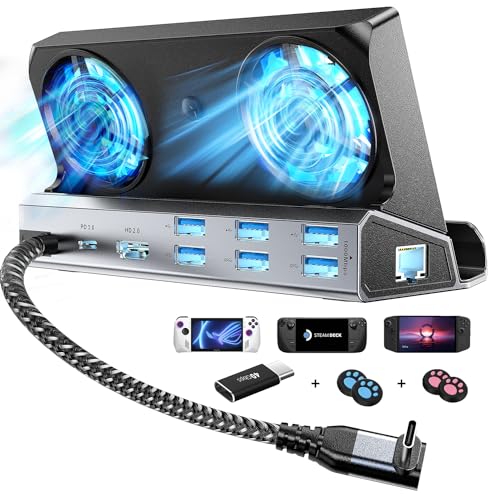
The YCE 12-in-1 Dual Fan Steam Deck Dock is designed as a central hub for your handheld gaming console, focusing on connectivity, protection, and most importantly, sustained performance through active cooling.
Its core function is as a versatile docking station. It connects your device to a TV or monitor via its HDMI 2.0 port, supporting 4K resolution at 60Hz for a big-screen experience. For stable online play, it includes a Gigabit Ethernet port.
It also expands your connectivity with six USB ports (three USB 3.0 and three USB 2.0) for peripherals like controllers, keyboards, or external storage. The USB-C PD 3.0 port delivers up to 100W of power to charge your device while its docked.
Compatibility is a major highlight.
This dock works with a wide range of devices that use a USB-C port, including the Valve Steam Deck (and OLED model), ASUS ROG Ally and Ally X, Lenovo Legion Go and its variants, the MSI Claw, and Nintendo Switch 1 & 2. It’s also compatible with many Windows handhelds, laptops, tablets, and phones. Please note, the physical design requires your device to be under 27cm thick to fit securely.
A key differentiator is its cooling system.
Steam Deck Docking Station Buying Guide
A Steam Deck docking station enables TV connectivity and peripheral use for a console-like experience. But not all docks are created equal. Choosing teh right one means looking at a few key specs to ensure it fits your setup and needs perfectly.
Port Selection and Power Delivery
What do you want to plug in? A good dock needs enough ports. Look for multiple USB-A ports for controllers and keyboards, a USB-C port for charging, and a reliable HDMI output for your TV or monitor. Crucially, the dock must support Power Delivery (PD) pass-through charging. This means it can charge your Steam Deck at full speed while you play, so your battery doesn’t drain on the big screen. Without sufficient PD, the experience falls apart.
Build Quality and Design
This isn’t just a cable; it’s a piece of your desk or entertainment center. A sturdy, well-weighted dock won’t slide around when you plug in your Deck. Some have a sleek, official look, while others offer a more utilitarian angled design. Consider how it will sit on your shelf. Does it have a non-slip base? A flimsy, lightweight dock can feel like a liability, especially with your prized handheld perched on top.
Video Output Support
Dreaming of 4K? Your dock needs to support it. Check the maximum resolution and refresh rate the dock’s HDMI port can handle. Many docks cap at 4K 60Hz, which is great for most TVs and provides a sharp picture. However, if your monitor supports higher refresh rates for smoother gameplay, you’ll need a dock that matches that spec. Always verify this against your display’s capabilities to avoid any dissapointment.
Frequently Asked Questions About Steam Deck Docking Station
What does a Steam Deck dock actually do?
It turns your handheld Steam Deck into a home console. You plug your Deck into the dock, and it connects to your TV or monitor, wired internet, and peripherals like controllers, keyboards, or external storage.
Do I need the official Steam Deck Dock?
Not necessarily. While Valve’s official dock is guaranteed to work perfectly, many third-party USB-C hubs work great too. Just make sure they can deliver enough power and have the ports you need.
What ports should I look for?
You’ll want an HDMI or DisplayPort for video, a USB-C port for power delivery (at least 45W is best), and a few USB-A ports for accessories. An ethernet port for stable online gaming is a really nice bonus to have.
Will any USB-C hub work?
Most will, but there’s a catch. The dock needs to support DisplayPort Alt Mode over USB-C to send video to your screen. Most modern hubs do, but it’s good to double-check the product description before you buy.
Can I charge my Steam Deck while it’s docked?
Yes, absolutely! This is a key feature. A good dock will pass through power from your Steam Deck’s original charger (or a compatible one) to keep your device charged while you play on the big screen.
Does the dock improve performance?
No, the dock itself doesn’t make the Steam Deck more powerful. However, using a wired ethernet connection can improve download speeds and online gameplay stability compared to WiFi. Some games might feel smoother if your TV has a higher refresh rate to.
Do all my games work on a TV?
Most do, but it depends on the game’s resolution support. The Steam Deck’s screen is 1280×800, but your TV is likely 1080p or 4K. Most games will scale up just fine, but you might need to adjust in-game graphics settings for the best performance on a larger display.
The Final Call
Turn your handheld Steam Deck into a full desktop gaming rig instantly with these. The right dock gives you a simple, one-plug connection to your big screen, keyboard, and favorite peripherals. It’s teh easiest way to shift from portable to powerhouse mode without any fuss. You get more options for how and where you play.
So, think about what you need most. Is it extra ports for your gear, strong charging support, or a compact design? Any choice here is a good upgrade. Just pick the steam deck docking station that fits your setup and budget. Then plug in and enjoy a bigger, more versatile gaming experience right away.