You’ve got a killer PC build, but those last few case fans are just sitting there, unplugged. Your motherboard only has so many fan headers, right? That’s where a trusty pc fan splitter becomes your new best friend. This simple little cable is the secret to maximizing your airflow without needing a whole new motherboard.
It’s a super affordable fix that can tidy up your build and give you way more control. We’ll look at what to consider when picking one out, from how many fans it can handle to whether it supports PWM. Getting all your fans spinning is easier then you might think!
Product Comparison Table: 10 Best Pc Fan Splitter
| Image | Why We Like This Product | Editor’s Rating | |
 |
Cable Matters 2-Pack 2 Way 4 Pin PWM Fan…
|
9.9 |
Read Review |
 |
Noctua NA-SYC1 chromax.Black, 4 Pin Y-Cables for PC Fans…
|
9.7 |
Read Review |
 |
Noctua NA-SYC1, 4 Pin Y-Cables for PC Fans (Black)
|
9.4 |
Read Review |
 |
3 Way PWM Fan Splitter Cable, 2 Pcs 4…
|
9.2 |
Read Review |
 |
ARCTIC 4-Pin PWM Fan Splitter Cable – PST Extension-Cable…
|
9.0 |
Read Review |
 |
AVERZELLA 2 Pack Cooling Fan 1 to 5 Hub,…
|
8.7 |
Read Review |
 |
Aypzuke 3 Pack Computer PC PWM Fan Splitter Cable…
|
8.5 |
Read Review |
 |
UMLIFE 2-Pack 4-Pin PWM Fan Hub – 1 to…
|
8.3 |
Read Review |
 |
PANO-MOUNTS 2 Pack 10.6inch 4Pin PWM Fan Extension Splitter…
|
8.0 |
Read Review |
 |
VWEICYY Fan Hub,Compatible 3PIN/4PIN PC Fan Splitter.PWM Fans Hub…
|
7.8 |
Read Review |
Quick Review For Top 10 Pc Fan Splitter
Cable Matters 2-Pack 2 Way 4 Pin PWM Fan Splitter Cable – 4 Inches, PC Fan Splitter 1 to 2 Converter, PC PWM Extension Cable

Cable Matters 2-Pack 2 Way 4 Pin PWM Fan Splitter Cable
If you’re looking to add more cooling fans to your PC but your motherboard is running out of headers, this simple cable is the solution. The Cable Matters 2-Pack PWM Fan Splitter lets you connect two case fans to a single 4-pin fan header on your motherboard. It’s a straightforward way to boost airflow inside your computer case without needing a complex fan controller.
This is a PWM splitter, which means it supports motherboards with 4-pin headers and PWM control. The key advantage here is speed synchronization. The cable transmits the PWM signal from your motherboard to both fans, so they can spin at the same speed based on your system’s temperature. This ensures consistent cooling performance. One important note: only the primary connector on the splitter sends the fan’s RPM signal back to the motherboard for monitoring.
The second fan operates in tandem, but its speed isn’t reported individually. This is a standard design that prevents signal conflicts and works perfectly with your motherboard’s software. A major benefit of this product is its broad compatibility. It works with both 3-pin and 4-pin case fans, giving you flexibility with your existing or new cooling components.
Noctua NA-SYC1 chromax.Black, 4 Pin Y-Cables for PC Fans (Black)

Noctua NA-SYC1 chromax.Black Y-Cables
If you’re building or upgrading a PC, you know how quickly fan cables can become a tangled mess. More fans mean better cooling, but your motherboard only has so many fan headers. That’s where the Noctua NA-SYC1 kit comes in. It provides a simple, effective solution for managing your system’s airflow without cluttering your case or maxing out your motherboard.
This kit includes three individual y-cables, each designed to let you connect two fans to a single fan header on your motherboard. It’s a straightforward way to double your fan capacity on supported headers. Each cable is built for 4-pin PWM (Pulse Width Modulation) fans, allowing for precise speed control. The key here is that both fans connected to the single cable will be controlled simultaneously.
They’ll recieve the same PWM signal, so they’ll spin at the same speed based on your system’s temperature or your manual settings. This ensures synchronized operation for a consistent airflow pattern. A great feature of these cables is their broad compatibility. While they use a 4-pin connector, they are fully capable of supporting both 3-pin DC fans and 4-pin PWM fans.
Noctua NA-SYC1, 4 Pin Y-Cables for PC Fans (Black)
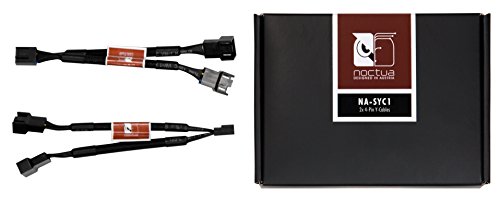
Noctua NA-SYC1: These are simple but really useful Y-cable splitters designed for your PC’s cooling fans. If your motherboard has a limited number of fan headers, or if you want to connect two fans to a single header for synchronized operation, this set provides a clean and reliable solution. Essentially, each cable in this set lets you run two fans from one motherboard fan port. It’s a Y-type splitter, so one end plugs into your motherboard, and the other two ends connect to your fans.
This is particularly handy for setting up push-pull configurations on a radiator or for controlling two case fans in the same zone together, keeping your cable management much tidier. A key feature is its support for PWM control. The cable is built with a 4-pin design, allowing you to connect two 4-pin PWM fans and have them both recieve the same speed signal from your single motherboard header.
This means both fans will speed up and slow down in unison based on your system’s temperature or your manual settings. It’s important to note that only the speed signal (RPM) from one of the two fans is reported back to the motherboard for monitoring, which is standard for most splitters and prevents signal conflicts. Versatility is a strong point here. While made for 4-pin fans, the connectors are compatible with older 3-pin DC fans as well.
3 Way PWM Fan Splitter Cable, 2 Pcs 4 Pin PWM Fan Splitter, Fan Header Splitter, PC Fan Splitter 1 to 3 Converter, Case Fan Splitter, for Computer ATX Case 4-Pin/3-Pin Cooling Fan Cable, 11 inch

The 3 Way PWM Fan Splitter Cable is a straightforward tool for anyone looking to expand their computer’s cooling capabilities without needing extra motherboard headers. At its core, this product solves a common problem: you want to install multiple case fans for better airflow, but your motherboard has a limited number of fan power connectors. This is where this 2-pack of splitters comes in handy.
Each splitter acts as a 1 to 3 converter.
You plug a single 4-pin PWM header on your motherboard into one end, and it gives you three separate 4-pin ports to connect your fans. This design is efficient and convenient, letting you power and control several fans from a single motherboard signal. It means you can ensure all your fans spin in harmony, helping to maintain optimal cooling performance and a quieter system under different loads.
A major plus is its versatile compatibility.
These splitters work with both the modern 4-pin PWM fans and the older 3-pin voltage-controlled models. So whether your building a gaming PC, a workstation, or just upgrading an older ATX case, this cable has you covered. It simplifies your setup process by eliminating the need to hunt for specific adapters.
Cable management is another area where this product shines. By consolidating multiple fan connections into one cable run, it significantly reduces clutter inside your case.
ARCTIC 4-Pin PWM Fan Splitter Cable – PST Extension-Cable for 4 Case Fans, PC Fans, PWM Splitter Cable, Multi-Fan Connector, Fan Splitter, Extension Cable, Splitter, Y-Splitter, Adapter, PC – Black

The ARCTIC 4-Pin PWM Fan Splitter Cable – PST is a straightforward solution for a common PC building challenge: not having enough motherboard headers for all your case fans. This simple cable lets you connect up to four fans to a single 4-pin PWM header on your motherboard, which is ideal for setting up multi-fan configurations in your case for better airflow without needing a more complex hub.
One of the key things to understand is how it manages fan control.
The cable passes the PWM (Pulse Width Modulation) signal from your motherboard synchronously to all connected fans. This means all fans will adjust their speed together based on the system’s temperature readings, keeping noise and cooling in sync. It’s important to note that only the first fan socket on the splitter reports its RPM back to the motherboard.
The system uses this reading to monitor and control the entire group, so its generally best to use identical fans or ones with very similar power draw on the same splitter for predictable performance.
The design really helps with cable management inside your PC. With a total length of 70 centimeters and the first socket branching off at 40 cm, it gives you plenty of reach to position fans in optimal spots within your case.
AVERZELLA 2 Pack Cooling Fan 1 to 5 Hub, All 4 Pin Cooling Fans Power Extension Cable for PC Case Internal Motherboard Fan, 5 Way Splitter Wire for ATX Computer Case, Sleeved Braided (16 inches)

The AVERZELLA 2 Pack Cooling Fan Hub is a practical solution for a common PC building challenge: not having enough motherboard headers for all your case fans. If you’re looking to improve your system’s airflow but your motherboard ports are all used up, this splitter cable provides a clean and efficient way to connect multiple fans.
At its core, this is a PWM fan hub. It takes a single 4-pin PWM header on your motherboard and extends it to five separate ports.
This setup allows you to power and control up to five fans from one source, which significantly reduces the electrical load on your motherboard compared to daisy-chaining splitters. It’s a smarter way to manage your cooling setup, ensuring all connected fans can recieve stable power and respond to your system’s temperature changes based on the PWM signal from the single header.
Compatibility is a key strength here.
The hub uses a standard 4-pin female connector for the motherboard end and five 4-pin male connectors for your fans. Importantly, it supports both 4-pin PWM and 3-pin DC fans. This means you can mix and match most common case fans without issue, giving you flexibility in your component choices.
Aypzuke 3 Pack Computer PC PWM Fan Splitter Cable 1 to 3 (4 Pin+3 Pin)

The Aypzuke 3 Pack Computer PC PWM Fan Splitter Cable 1 to 3 (4 Pin+3 Pin) is a straightforward solution for a common PC building challenge: not having enough motherboard headers for all your case fans. If you’re looking to improve your system’s cooling without the hassle of a complex controller, this simple cable pack might be exactly what you need.
At its core, this splitter lets you connect up to three case fans to a single 4-pin PWM fan header on your motherboard.
This is incredibly useful for creating a clean, organized build. Instead of multiple cables snaking back to the motherboard, you can consolidate them. The 26cm length of each cable gives you flexibility to position your fans optimally within your case, helping you achieve that tidy interior look we all aim for. By connecting more fans, you directly increase airflow inside your chassis.
Better airflow means heat is moved out more efficiently, reducing the overall operating temperature of your components. This is crucial for maintaining your CPU’s performance and ensuring system stability, especially during demanding tasks or gaming sessions.
Compatibility is a key strength here. Each splitter in the pack features one 4-pin PWM connector and two 3-pin connectors. This design means you can mix and match your fans.
UMLIFE 2-Pack 4-Pin PWM Fan Hub – 1 to 5 Way Splitter Power Supply Cable for PC Motherboard Case Cooling – Extension Cord for ATX Computer 4-Pin and 3-Pin Fans

The UMLIFE 2-Pack 4-Pin PWM Fan Hub is designed to simplify and organize your PC’s internal cooling system. If your motherboard has a limited number of fan headers, this hub provides a straightforward solution for connecting multiple case fans from a single power source. It’s a practical tool for managing airflow without needing a more complex controller.
This hub functions as a 1-to-5 splitter, allowing you to connect up to five individual case fans to one motherboard fan header.
The cable itself is 13 inches (33cm) long, giving you enough flexability to route it neatly within your case for a clean build. The wiring uses 24AWG tin-plated copper, which offers strong conductivity and resists corrosion over time. The PVC insulation around the wires is flame retardant, adding a layer of safety for your components.
A key feature is its compatibility with both 4-pin and 3-pin fan connectors. The hub’s primary design is for 4-pin PWM (Pulse Width Modulation) fans.
When you use PWM fans connected through this hub, your motherboard can intelligently control their speed based on system temperature, helping to balance cooling performance with noise. If you connect standard 3-pin fans, they will still recieve power and function perfectly, but they’ll typically run at a constant full speed since the 3-pin standard lacks the PWM control signal. This makes the hub a versatile choice for mixed fan setups.
Installation is straightforward.
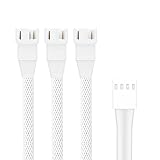
PANO-MOUNTS 2 Pack 10.6inch 4Pin PWM Fan Extension Splitter Cable 1 to 3 Ways – with 3Pin 4Pin Male Connector for Computer Case & CPU Cooling Fans(White)

The PANO-MOUNTS 2 Pack 10.6inch 4Pin PWM Fan Extension Splitter Cable 1 to 3 Ways is a straightforward solution for a common PC building challenge. You know how motherboard fan headers can be limited, right? This cable lets you connect up to three fans to a single 4-pin header on your motherboard. It’s designed to help you expand your cooling setup without needing a more complex fan hub, keeping your build simple and cost-effective. Its core function is as a 4-pin PWM fan splitter.
This means it can connect two 3-pin case fans and one 4-pin CPU fan all to that one motherboard port. The key here is the PWM control. The splitter carries the motherboard’s pulse-width modulation signal to all connected fans. This allows your system software to synchronize and control the speed of all three fans based on temperature data. You get coordinated cooling, which is perfect for optimizing airflow and noise levels in your PC case.
It saves valuable chassis interface space and contributes to much neater cable management, which is always a plus for visibility and airflow. You’ll appriciate the build quality. Each cable is 27cm (about 10.6 inches) long, giving you enough slack for clean routing in most standard cases. They come in a durable white braided sleeve. This isn’t just for looks—it resists tangling and fraying—but the sleek white design does seamlessly complement modern, light-themed or RGB-lit builds.
VWEICYY Fan Hub,Compatible 3PIN/4PIN PC Fan Splitter.PWM Fans Hub for Desktop PC Cooling Fans,Computer DIY,1 to 5

The VWEICYY Fan Hub, 1-to-5 Splitter is a tool designed for managing multiple cooling fans in your desktop PC. If you’re building or upgrading a computer, you know that case fans are crucial for keeping temperatures down. But motherboard fan headers are often limited. This hub solves that by letting you connect up to five fans to a single motherboard header, simplifying your setup and reducing cable clutter.
Compatibility is a key feature here.
The hub uses a standard 4-pin PWM (Pulse Width Modulation) connector that plugs into your motherboard. This design is smart because it supports both 4-pin PWM and older 3-pin voltage-controlled fans. So whether your fans are new or from an older build, this hub can handle them.
The connected fans will recieve power and control signals from that single motherboard port, allowing for synchronized speed management through your BIOS or software.
Each of the five output ports on the hub is a 4-pin female connector. They are designed to accept the standard male connectors from your case fans. The included cable that connects the hub to your motherboard is 15 inches long, giving you plenty of flexibility to place the hub where it makes the most sense inside your case.
Pc Fan Splitter Buying Guide
A PC fan splitter allows multiple fans to run from a single motherboard header. This is a simple, budget-friendly way to add more cooling to your case without needing a fancy controller. But not all splitters are created equal. Here’s what to look for to get the right one for your setup.
Number of Fans Supported
How many fans do you need to power? Splitters typically come in 2-way, 3-way, or 4-way versions. A 2-way splitter is perfect for adding a second fan to a single header. Need to power a whole array? A 4-way splitter might be your answer. Just remember, there’s a limit to how much power a single header can provide, so check your motherboard’s specs to be safe.
PWM vs. DC Control
This is crucial. Do your fans use 4-pin PWM connectors or older 3-pin DC connectors? You need a splitter that matches. A PWM splitter (4-pin) lets the motherboard control the speed of all connected fans precisely. A DC splitter (3-pin) usually runs all fans at full speed, unless the header supports voltage control. Using the wrong type means you’ll loose that fine-tuned speed control.
Build Quality & Cable Length
Cheap, thin wires can be a real headache. Look for splitters with decently thick cables and solid, molded connectors. A good build prevents loose connections and voltage drops. Cable length matters too! Measure the distance from your fan header to where your fans are mounted. A splitter thats too short forces messy cable routing, while one thats too long adds clutter.
Additional Features
Some splitters include useful extras. A SATA power passthrough connector draws extra power directly from your PSU, taking the load off your motherboard—great for powering three or more high-speed fans. Others might have a tachometer wire for only one fan, so your motherboard reads just one fan’s speed. It’s a small detail that keeps your BIOS happy.
Frequently Asked Questions About Pc Fan Splitter
What is a PC fan splitter?
It’s a simple cable that lets you connect multiple fans to a single motherboard header. This is great for adding extra cooling without needing more ports on your board.
How many fans can I run on one splitter?
Most common splitters support 2 or 3 fans. You can find some that handle more, but there’s a limit. You need to check the power draw of all the fans combined to stay safe.
Will using a splitter lower my fan speeds?
No, it shouldn’t. All fans connected to the same splitter will recieve the same speed signal from the motherboard. They’ll all run at the same percentage you set.
Is it safe for my motherboard?
Yes, if you don’t overload it. Each fan header has a power limit, usually 1 amp. Add up the amps for each fan (it’s on the fan label). Just make sure the total is under the header’s limit.
What’s the difference between a splitter and a hub?
A splitter is a passive cable. A hub is a powered device that plugs into your power supply directly. Hubs can support many more fans and often have extra features.
Do I need PWM or DC splitters?
You need to match the type to your fans. PWM splitters have 4 pins and are for PWM fans. DC splitters have 3 pins and are for voltage-controlled fans. Using the wrong one means you can’t control the speed properly.
Can I mix different fan models on one splitter?
You can, but it’s not ideal. Since thay all get the same signal, they’ll all try to run at the same speed. If the fans have very different designs, one might sound louder or behave oddly.
Do splitters affect RGB lighting?
No, a basic fan splitter only handles power and speed control. For RGB, you need a separate RGB splitter or controller. Those cables are for the lights only and won’t power the fan itself.
One Last Look
Setting up your PC’s cooling doesn’t need to be a headache. With the right approach, you can get all your fans spinning smoothly from a single motherboard header. It keeps your build clean and your components running at a good temperature.
Remember, a good pc fan splitter is a simple but powerful tool. It solves a common problem without complicating things. Just double-check your power needs, plug everything in securely, and you’re all set. You’ll enjoy a quieter, cooler system and can feel good about a job well done.